Apple officially launched macOS 27 Golden Gate on September 14, 2026, marking a pivotal transition in the company’s desktop computing history by fully integrating advanced artificial intelligence into the core user experience. The release, which follows months of developer testing since its initial preview at the Worldwide Developers Conference (WWDC) in June, introduces a sophisticated Siri AI experience powered by Google Gemini. This update represents the 27th major version of the Mac operating system, arriving at a time when the tech industry is increasingly shifting toward generative intelligence and hybrid cloud-on-device processing.

The deployment of macOS 27 Golden Gate signals Apple’s commitment to maintaining its lead in the high-end workstation and consumer laptop markets. By naming the version "Golden Gate," Apple continues its tradition of California-inspired monikers while metaphorically positioning the software as a bridge between traditional computing and the burgeoning era of autonomous digital assistants. The update is now available for download across a wide range of hardware, including the latest M-series Macs and the newly introduced MacBook Neo.
The Evolution of Siri AI and the Google Gemini Integration
The most significant development in macOS 27 Golden Gate is the total overhaul of Siri. In a move that surprised many industry observers earlier this year, Apple entered into a strategic partnership to utilize Google Gemini’s large language models to provide the reasoning engine for its virtual assistant. This integration allows Siri to understand complex, multi-step instructions and maintain context over long conversations, a feature that was largely absent in previous iterations.

Siri now functions as a standalone application on macOS, though it remains deeply embedded in the system’s architecture. Users can interact with the assistant through a redesigned interface that utilizes "Liquid Glass" aesthetics—a visual style that makes the assistant feel like a fluid part of the desktop environment. Beyond simple voice commands, the new Siri can execute cross-app actions, such as retrieving a specific document from a buried folder and drafting an email summary of its contents in a separate mail client.
To address the inherent privacy concerns of cloud-based AI, Apple has introduced its Private Cloud Compute platform. This infrastructure ensures that data sent to the cloud for processing is never stored or accessible to Apple or its partners. The company claims this "stateless" processing model sets a new industry standard for data security in the age of generative AI. Furthermore, users can customize the assistant’s personality and vocal delivery, adjusting pitch, tone, and pacing to suit their preferences.

Advanced Multimedia Capabilities: Spatial Reframing
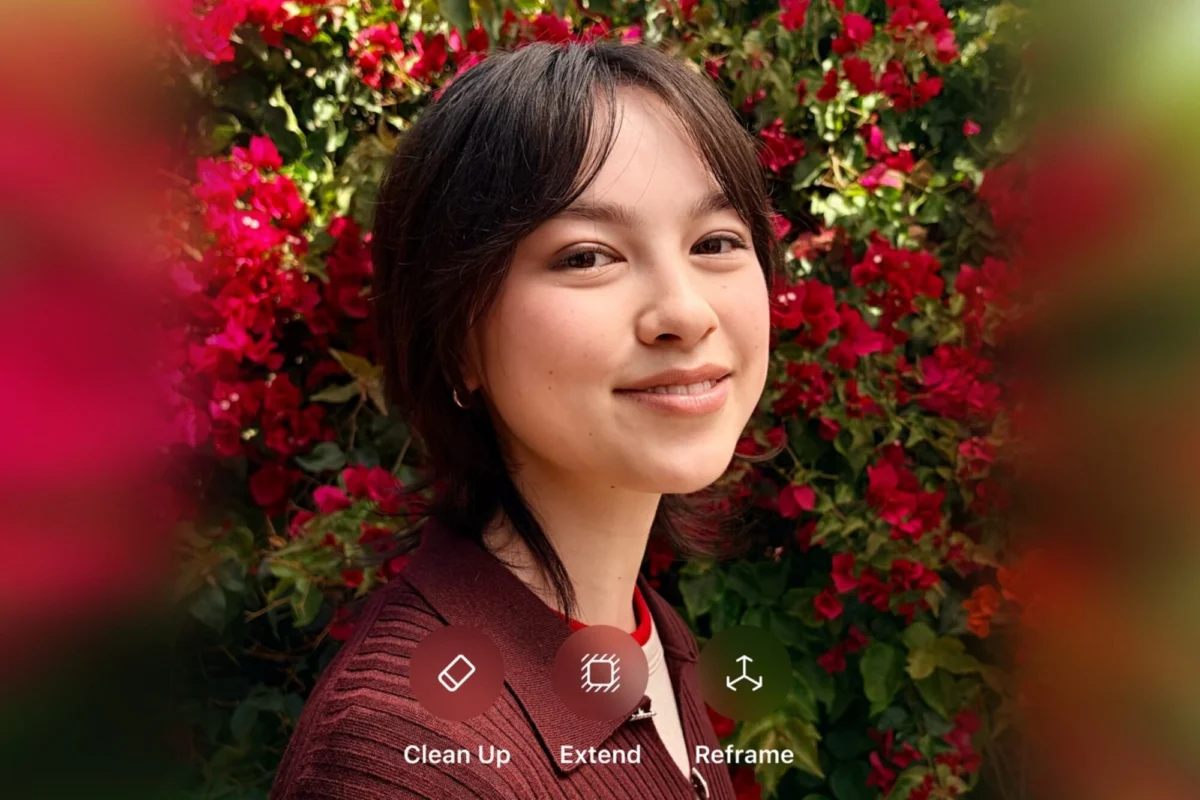
Photography and video editing have long been pillars of the Mac experience, and macOS 27 Golden Gate introduces a flagship tool known as Spatial Reframing. Utilizing generative AI, this feature allows users to adjust the camera angle of a photo after it has been captured. By analyzing the depth data and visual textures of a 2D image, the system can "re-render" the scene from a slightly different perspective, effectively allowing users to fix poor framing or create a sense of three-dimensional movement.
In addition to Spatial Reframing, the Photos app has been updated with sophisticated "Clean Up" tools. These allow for the seamless removal of background distractions and the extension of image borders using context-aware generative fill. These tools are designed to be intuitive enough for casual users while remaining powerful enough for professional photographers who need to make quick adjustments to their portfolios.

Strengthening the Ecosystem: Parental Controls and Child Safety
Recognizing the growing demographic of younger users on the Mac platform, Apple has integrated comprehensive parental controls into macOS 27 Golden Gate. These updates are particularly relevant following the release of the MacBook Neo, a device aimed at educational and entry-level markets. The "Family" section within the Settings menu has been redesigned to provide a centralized hub for monitoring and managing device usage.
One of the standout additions is the "Ask to Browse" feature. When enabled, this tool requires minors to send a real-time request to a parent’s iPhone or Mac before accessing a new website. Parents also receive detailed analytics regarding app usage and screen time, allowing them to set strict schedules or "downtime" periods. These measures are part of Apple’s broader "Child Safety" initiative, which aims to balance digital freedom with protective oversight.

Productivity Enhancements: Safari Group Tabs and AI Shortcuts
Safari, the native web browser of macOS, receives a significant organizational update in version 27. The introduction of Group Tabs allows users to categorize their browsing sessions into distinct workspaces, such as "Financial Planning," "Academic Research," or "Travel." This feature is designed to reduce the cognitive load for power users who frequently manage dozens of open tabs. These groups sync across the entire Apple ecosystem, ensuring a seamless transition from a MacBook to an iPad or iPhone.
Furthermore, Apple is attempting to democratize its "Shortcuts" automation tool. Historically, Shortcuts were utilized primarily by tech-savvy individuals due to the complexity of building logical workflows. macOS 27 Golden Gate introduces "Describe a Shortcut," a feature that leverages Siri AI to build automations based on natural language descriptions. A user can simply tell the system, "Every Friday at 5:00 PM, resize all images in my ‘Downloads’ folder to 1080p and upload them to my cloud storage," and the OS will generate the necessary logic and execute the task automatically.

Mapping the Future with Visual Intelligence
The Apple Maps experience has been significantly enriched through the application of "Visual Intelligence" models. The "Flyover" feature, which provides 3D aerial views of major cities, now renders architectural details and natural landscapes with unprecedented clarity. According to Apple’s engineering team, the system can now identify and render individual tree species and intricate architectural fixtures, such as gargoyles or window frames, using high-resolution aerial imagery combined with AI-driven upscaling.
This level of detail is not merely aesthetic; it integrates with the broader macOS ecosystem to provide more accurate local data. Users can interact with the 3D environment to find business hours, reviews, and indoor maps of major transit hubs or shopping centers directly within the Flyover view.

System Performance and the "Liquid Glass" Interface
Under the hood, macOS 27 Golden Gate focuses on "quality of life" improvements that enhance the snappiness of the interface. Apple has optimized the file system to allow for faster AirDrop transfers and near-instantaneous file browsing, even on high-capacity external drives. The "Liquid Glass" design language, which debuted in a more limited capacity in previous versions, has been refined to eliminate visibility issues and glitches reported in macOS 26.
This design philosophy emphasizes transparency, depth, and motion. Windows now appear to float over the desktop with subtle shadows that react to the user’s cursor movement. These visual refinements are paired with improved energy efficiency, extending the battery life of M-series MacBooks during AI-intensive tasks.

Hardware Compatibility and Future Roadmap
Apple has confirmed that macOS 27 Golden Gate is compatible with a broad range of silicon, including all devices powered by the M1 through M6 chips. The operating system is also the native software for the newly announced iPhone 18 Pro and the Apple Watch Series 12, ensuring deep integration between mobile and desktop platforms.
While the current release is feature-rich, Apple has already teased future updates planned for later in the 2026-2027 cycle. These include "Genmoji," a tool for creating AI-generated emojis on the fly, and "Image Playground," a dedicated space for generative art creation. Additionally, a more advanced "Screen Awareness" feature for Siri is expected in a subsequent point release, which will allow the assistant to "see" and interact with the content currently displayed on the user’s monitor.

Industry Impact and Market Positioning
The release of macOS 27 Golden Gate comes at a critical juncture for Apple as it faces stiff competition from Microsoft’s AI-integrated Windows environment and Google’s cloud-centric ChromeOS. By blending local processing power with Google’s Gemini intelligence, Apple is attempting to offer a "best of both worlds" scenario: the speed and privacy of local hardware with the vast knowledge base of a global AI leader.
Market analysts suggest that the success of macOS 27 will depend largely on user adoption of the new Siri. For years, Siri was criticized for lagging behind competitors; however, the Golden Gate update represents a definitive attempt to silence those critics. As the lines between operating systems and AI assistants continue to blur, Apple’s latest offering positions the Mac not just as a tool for creation, but as a proactive partner in the user’s daily workflow.

The global rollout of macOS 27 Golden Gate is expected to be completed within the week, with millions of users predicted to upgrade immediately to access the new AI capabilities. As the "Golden Gate era" begins, the tech industry will be watching closely to see how these advancements redefine the relationship between humans and their computers.